

Five years from now, you'll probably wish you'd started investing with Stock Advisor
Join over half a million premium members receiving:
- New stock picks each month
- Detailed analysis of companies
- Model portfolios and advanced tools
- Live streaming during market hours
Stock Advisor Returns
+655%
S&P 500 Returns
+147%
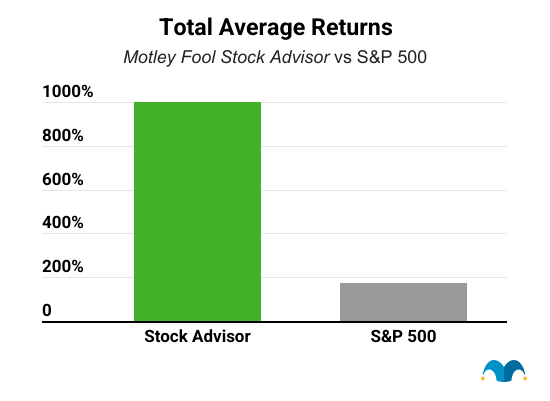
Returns as of 04/18/2024. Stock Advisor launched in February 2002.
Featured Investing News

1 Reason ASML's Revenue Could Soar in 2025 and Beyond

Billionaire Bill Ackman Has Almost 20% of his Pershing Square Portfolio Invested in This Artificial Intelligence (AI) Growth Stock

Is Micron Technology Stock Still a Buy Near Its All-Time High?

This Incredible Dividend Stock Hit a Speed Bump. Time to Sell?
Trending News
- The Social Security Cost-of-Living Adjustment (COLA) Forecast for 2025 Was Just Updated, and It May Surprise Retirees
- Opinion: These Will Be the 4 Largest Companies by 2035
- 1 Top Cryptocurrency to Buy Before It Soars 5,000%, According to Cathie Wood
- 3 No-Brainer Stocks to Buy With $100 Right Now
- Billionaire Warren Buffett Recently Cut This Stock From Berkshire Hathaway's Portfolio. It Just Dropped 53% In 1 Day. Here's What Investors Need to Know.
- 3 Dividend Kings to Buy for the Next Decade
- The Smartest Dividend Stocks to Buy With $400 Right Now
- Here's What Happens if You Claim Social Security at 62
- 1 Magnificent S&P 500 Dividend Stock Down 7% to Buy and Hold Forever
- 1 Stock-Split ETF That Could Turn $500 Per Month Into $1 Million, With Help From Nvidia, Microsoft, and Apple
- 2 Superb Artificial Intelligence (AI) Growth Stocks to Buy Before They Soar 63% and 70%, According to Select Wall Street Analysts
- Forget Nvidia: Billionaires Are Selling It and Buying 2 of Its Biggest Artificial Intelligence (AI) Rivals Instead
- 3 No-Brainer High-Yield Dividend Stocks to Buy Right Now for Less Than $1,000
- Cathie Wood Believes This Fast-Paced Artificial Intelligence (AI) Stock Can Skyrocket 1,138%, but Congress' Most Active Stock Trader Is Selling Shares
- The Best Cannabis Stock to Invest $1,000 in Right Now
Popular Topics
Best Stocks to Buy In 2024
Here are 10 stocks that could be excellent additions to your portfolio for the rest of 2024 and for years to come.
Top AI Stocks to Buy
Learn how you can make money investing in the wave of seasoned companies innovating in AI.
How to Invest in OpenAI & ChatGPT
Learn about the new AI chatbot dominating the internet.
6 Steps to Learn How to Buy Stocks
Here's a guide on what you need to do to get started with stock investing.
Top Marijuana Stocks to Invest In
The continued legalization of marijuana means growth for companies in this sector.
Best ETFs to Buy
Exchange-traded funds tend to be less volatile than individual stocks and provide portfolio diversification.
Top 3 S&P 500 Index Funds
Find out which index funds tracking the S&P 500 have the lowest fees and most closely track the market.
5 Top Hydrogen Stocks to Watch
A look at some of the leading hydrogen energy stocks that investors should keep an eye on.
High-Yield Dividend Stocks to Buy Right Now
A list of 20 high-yielding dividend stocks to consider buying now.
Dictionary of Financial Terms
The Motley Fool's list of financial terms. Making the world smarter, happier, and richer.
About The Motley Fool
Our Purpose: To make the world smarter, happier, and richer.
Founded in 1993 by brothers Tom and David Gardner, The Motley Fool helps millions of people attain financial freedom through our website, podcasts, books, newspaper column, radio show, and premium investing services. We believe that investing is empowering, enriching, and fun. We look forward to joining you on your journey to financial independence. Learn More
The Motley Fool Investing Philosophy
Learn How We Invest-
#1 Buy 25+ Companies Over Time
-
#2 Hold Stocks for 5+ Years
-
#3 Add New Savings Regularly
-
#4 Hold Through Market Volatility
-
#5 Let Your Winners Run
-
#6 Target Long-Term Returns
Investing Solutions Designed To Make Money Over The Long Term
Become a member today

Stock Advisor
Our base-level-membership giving you the foundation of a Foolish portfolio
Our Goal
Help members earn a positive return and build the foundations of a portfolio backed by Motley Fool principles.
Designed For
Individuals who are seeking easy-to-use guidance on investing in more familiar-named companies.
Recommended Minimum Portfolio Size
$5,000 +
Key Features
- Monthly stock recommendations (usually large and mid-cap stocks)
- Portfolio allocation guidance via The Motley Fool's Allocator tool
- On-going coverage of prior recommendations
- Access to Motley Fool Live video stream

Epic Bundle
A bundled membership that combines our four foundational stock-investing services into one
Our Goal
Help members outperform the benchmark by gaining exposure to a wider variety of stocks and investments.
Designed For
Individuals who are regularly adding new money to their brokerage accounts, interested in business, and want to spend more time learning the art of investing.
Recommended Minimum Portfolio Size
$25,000 +
Key Features
- Includes access to Stock Advisor + Rule Breakers + Everlasting Stocks + Real Estate Winners
- Weekly stock recommendations (ranging from small to large-cap stocks)
- Portfolio allocation guidance via The Motley Fool's Allocator tool
- On-going coverage of prior recommendations from all included services
- Access to Motley Fool Live video stream